PUBLISH CENTER
EVERYTHING YOU MAKE,
onto Etsy from one place
Whatever you shoot in Photo Studio, generate in Pattern Studio or build in Coloring Book lands here — with a draft title, a price and a category already filled in. Your job is to review it and send it.
Etsy account required · publishing spends no extra credits
THE PROBLEM
MAKING IT IS EASY. LISTING IT IS THE GRIND
Producing a design takes minutes; turning it into a listing Etsy will accept takes far longer. Download the file, switch tabs, write the title, hunt for the category, enter the price, upload the images — then do it all again for the next product. Most sellers never publish part of what they make.
THE FIX
THE DRAFT IS ALREADY WRITTEN
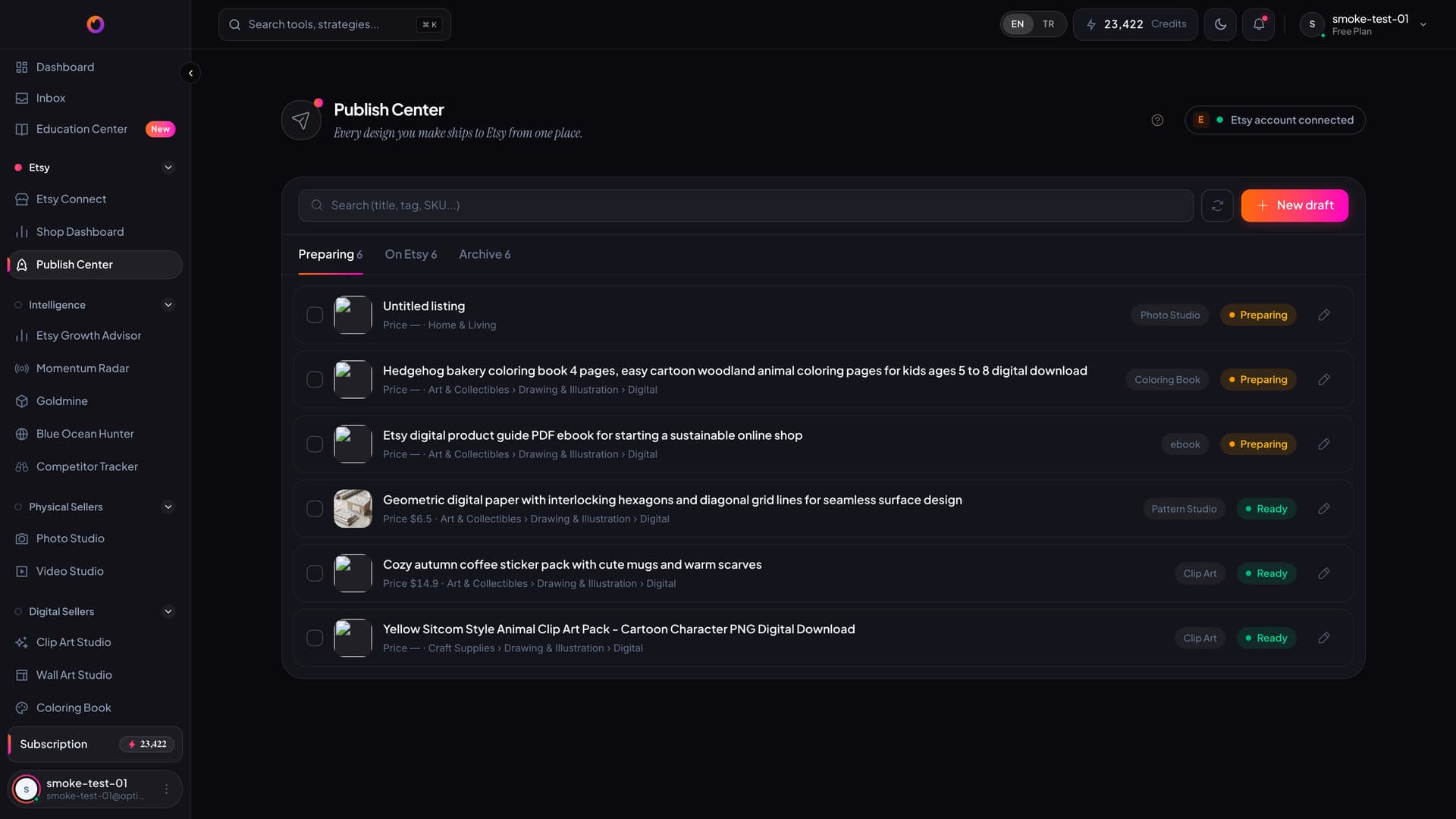
While a studio produces the output it also writes the listing draft: a suggested title, a price, a category and the images. Publish Center collects those drafts in one list, marks which are ready, and sends the ones you pick to Etsy.
THE SOURCES
WHAT ARRIVES FROM WHICH STUDIO
Output from five studios lands here directly — there is no download step in between.
Photo Studio
Studio-quality shots of a physical product, arriving ready to use as listing images.
Pattern Studio
Seamless patterns and digital papers, carried into the draft with their dimensions.
Wall Art Studio
Print-ready wall art, attached to the listing along with its ratio pack.
Coloring Book
Coloring pages and the cover; a multi-page product collects into a single listing.
Clip Art Studio
Transparent-background clip art packs, landing in the draft with the pack contents.
Completeness score
Every draft is scored out of 100; 80 and above counts as ready, and missing fields are visible before you publish.
DEMO
FROM DRAFT TO LISTING
in 16 seconds
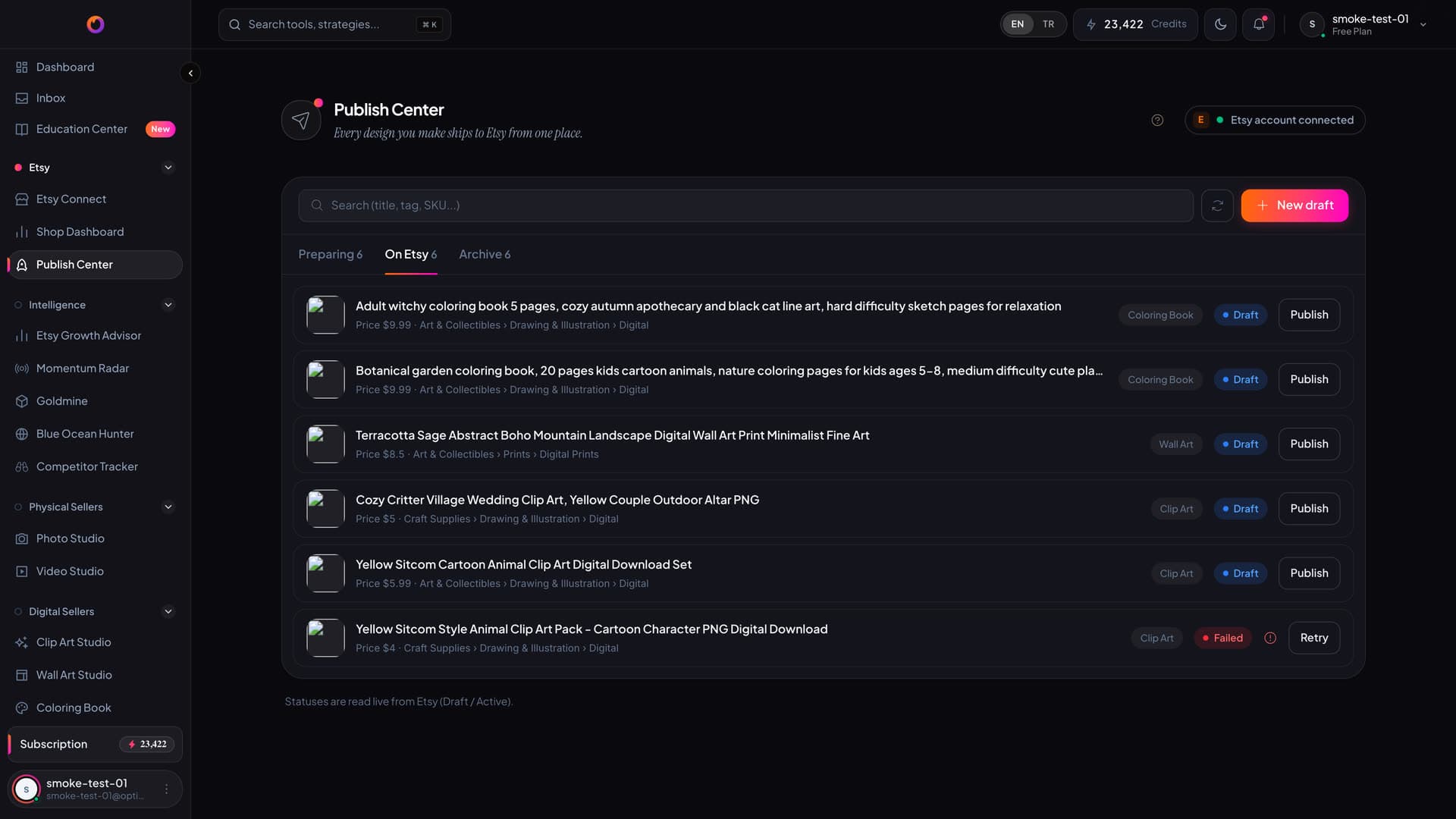
The tool's own screen: prepared drafts, the tab switch, and the listings created on Etsy.
THE FLOW
MAKE · REVIEW · SEND
Make it
Produce in any studio. The output lands in Publish Center as a draft automatically.
Review it
Check the title, price and category. The completeness score points at whatever is still missing.
Send it
Leave it as a draft on Etsy or activate it straight away. The listing is created on Etsy and its status appears in the list.
THE CURRENCY GATE
$9.50 IS NOT ₺9.50
Etsy reads the publish price in the shop's OWN currency. A draft prepared in dollars and published to a lira shop goes live at a fortieth of its intended price — and Etsy reports no error at all. We paid for that once. Now, if the shop currency doesn't match the draft's, the publish stops before it reaches Etsy.
- If the shop currency and the draft currency differ, the publish never starts
- You can switch the currency in one click — and switching clears the price, because a number typed in the old currency isn't correct under a new label
- Etsy's own validation errors are shown verbatim and never retried pointlessly
COMMON QUESTIONS
Do I have to connect my Etsy account?
Yes. Publish Center creates the listing in your own shop, so the Etsy connection is required. You can prepare drafts without it, but you can't send them.
Does publishing cost credits?
No. Credits are spent on production; sending a finished draft to Etsy carries no separate charge.
Does the listing go live immediately?
That's your choice. There are two modes: leave the listing as a draft on Etsy, or activate it right away. Draft mode lets you see the listing on Etsy with your own eyes before it goes on sale.
What happens if one fails in a bulk send?
The rest continue; the failed draft stays in the list with its reason. Etsy validation errors aren't retried, because a byte-identical request gets the same answer the second time.
Can I send a draft that isn't ready?
The completeness score shows what's missing but doesn't stop you. The only hard stops are Etsy's own validation and the currency gate — both there to keep a wrong listing from going live.
DON'T LEAVE
what you made unpublished
Output from five studios in one list. Review it, send it, and watch its status from the same screen.
No credit card · publishing spends no extra credits